Use this visual guide to recognize the controls before selecting them. Green dots mark the starting date and red dots mark the destination date; symbols and labels also distinguish their meaning.
Compact mobile artwork has the same meaning as the wider desktop artwork. Some main tabs currently show linked dates or a placeholder rather than a complete calculator.
Add or subtract dates


Opens the main calculator. Enter a starting date and whole years, months, weeks or days.
Date range


Opens the date-range tab. A result link carries both dates into this tab, which currently displays the linked dates. The star marks their connection.
Countdown


Opens Countdown. The hourglass represents the time from now until a fixed target date and time. Start changes to Stop while a timer is active and returns to Start when the target is reached. Result links prefill the target date.
Timezone conversion


Opens the timezone converter. Two clocks at different times and a connecting arrow represent the same moment in two zones. Mobile uses one clock.
Age

Selects the reserved age tab. This main tab is currently a placeholder.
Country information

Shows the selected country, region, date format and timezone information.
Plus result


Both results are visible together. Subtraction is on the left and addition on the right. Each result has a date-range link and Copy. Only addition has Share and a Countdown link. The Countdown link or switching directly from Add/Subtract to the Countdown tab starts a timer to midnight at the beginning of the latest Add result date in the selected site timezone. The selected date format stays the same when switching tabs. Day-of-year and week-number details also align to the corresponding edge.
Minus result


Both results are visible together. Subtraction is on the left and addition on the right. Each result has a date-range link and Copy. Only addition has Share and a Countdown link. The Countdown link or switching directly from Add/Subtract to the Countdown tab starts a timer to midnight at the beginning of the latest Add result date in the selected site timezone. The selected date format stays the same when switching tabs. Day-of-year and week-number details also align to the corresponding edge.
Reset

Restores today and the default calculator amounts. Review your inputs before continuing.
Copy result

Copies the selected result as text. If clipboard access is unavailable, the site offers selectable text.
Share link

Copies a link containing the selected calculation. It does not send a message or publish anything automatically.
SundyMondy logo (sundymondy.com)

Returns to the home calculator when selected in the header or footer. The same artwork identifies the browser tab.
World timezone map
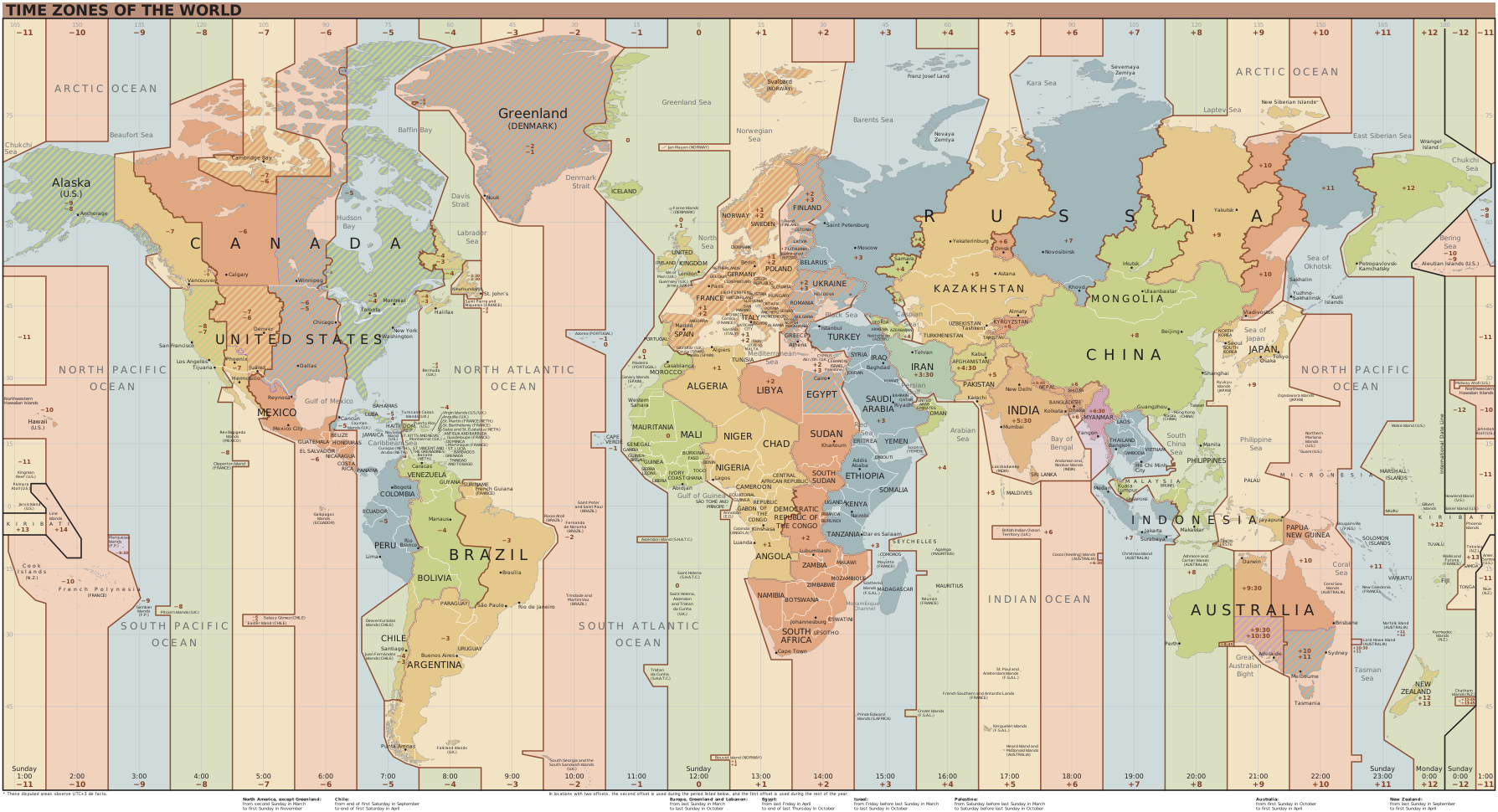
Illustrates timezones in the Help Center. Select the map to open the larger image. Choose your calculation timezone in the calculator header.
Timezones, UTC offsets and abbreviationsCalendar picker

Opens the date picker beside a date field. You can also type the date using the selected format.
Calculator help

The question mark inside a calendar expands or collapses the explanation and Help link on mobile. The calculation itself stays visible.
Amount arrows
Enter a start date and whole years, months, weeks or days. Each unit has its own increment: years and months offer 1, 3, 5 and 10; weeks offer 1, 5, 10 and 20; days offer 1, 10, 30 and 90. On mobile, plus is above the number and minus below it. Swipe the one-number wheel to choose an increment, or focus it and use Up/Down, Home or End. Reset restores increment 1 for every unit.
Sun: light theme

Switches to the light display theme. It does not change your calculation.
Moon: dark theme

Switches to the dark display theme. It does not change your calculation.
Half-filled circle: high contrast

Switches to the high-contrast display theme.
Warning rectangle

Marks the shared reminder to verify critical dates with the responsible authority. It is an informational notice, not a button.
Worked example
Start on October 12, 2026 and enter 10 days. The left result is October 2, ISO week 40; the right result is October 22, ISO week 43. With a Days increment of 30, plus changes 10 to 40 without changing the other units.
Try it →